Guides
Customer Support Agent Coaching Software: QA to Coaching | Intryc
Author
Published
Intryc
April 3, 2026
By Alex Marantelos
Updated September 2026.
Most coaching programs start from a manager's memory of a bad ticket, not the evaluation data. Intryc evaluates every conversation - human and AI - scores it against your scorecard, and turns the specific criteria an agent is missing into a coaching plan grounded in the actual tickets that flagged. This is QA-native coaching support, not live guidance and not a replacement for the manager who runs the session.
TL;DR
- Customer support agent coaching software should connect three things in one system: the QA finding, the coaching plan built from it, and the practice or monitoring that proves whether it worked. Most tools stop at the first one.
- Intryc's AutoCoaching only analyzes markdowns - the sub-max scores - on criteria a coach explicitly selects, caps a session at 6 action items, and links every point back to the source ticket. This is post-review coaching support, not in-call or live agent guidance.
- Failed evaluations convert into targeted simulations and quizzes on the same criteria, scored by the same AutoQA engine as live tickets - so training performance and live performance are directly comparable.
- QA managers still set coaching direction and deliver the session. AutoCoaching's job is to generate the personalized plan from QA data at the volume and consistency a manager alone cannot sustain across a full team - not to run the coaching itself.
- Coaching and performance signals - score trends, coaching workflow status, training activity, repeat mistakes - draw from 100% of evaluated conversations, not a sample, so the signal is real. Reports are a place to look, not proof a coaching session caused an outcome.
Does Intryc support agent coaching software?
As of September 2026, Intryc supports customer support agent coaching as part of its AutoQA and AutoCoaching products: evaluate a conversation against a custom scorecard, generate a personalized coaching plan tied to the specific criteria an agent is missing, and assign it as a coaching action - grounded in the actual conversations that flagged, not a generic template. Failed evaluations also convert into simulations and quizzes on the same skill, scored by the same engine as live tickets.
This is coaching support built on top of QA data - it happens after a conversation has been evaluated, not during it. Intryc does not offer live, in-call agent guidance, and it does not replace the QA manager who sets direction and delivers the session. The platform covers AutoQA, Evaluation Insights, AutoCoaching, and Training Simulations in one place, drawing from 100% of evaluated conversations, human and AI agents included, with 90% accuracy - guaranteed.
How QA findings become personalized coaching actions
Most support teams already have the QA finding. What breaks down is the step after it: a manager has to remember which criterion the agent is failing, decide what to coach on, and build a plan from scratch, usually from memory of one bad ticket rather than the pattern across all of them.
Intryc closes that gap with a defined workflow:
- Evaluate. Every conversation is scored against the team's custom scorecard - your scorecard, your rules.
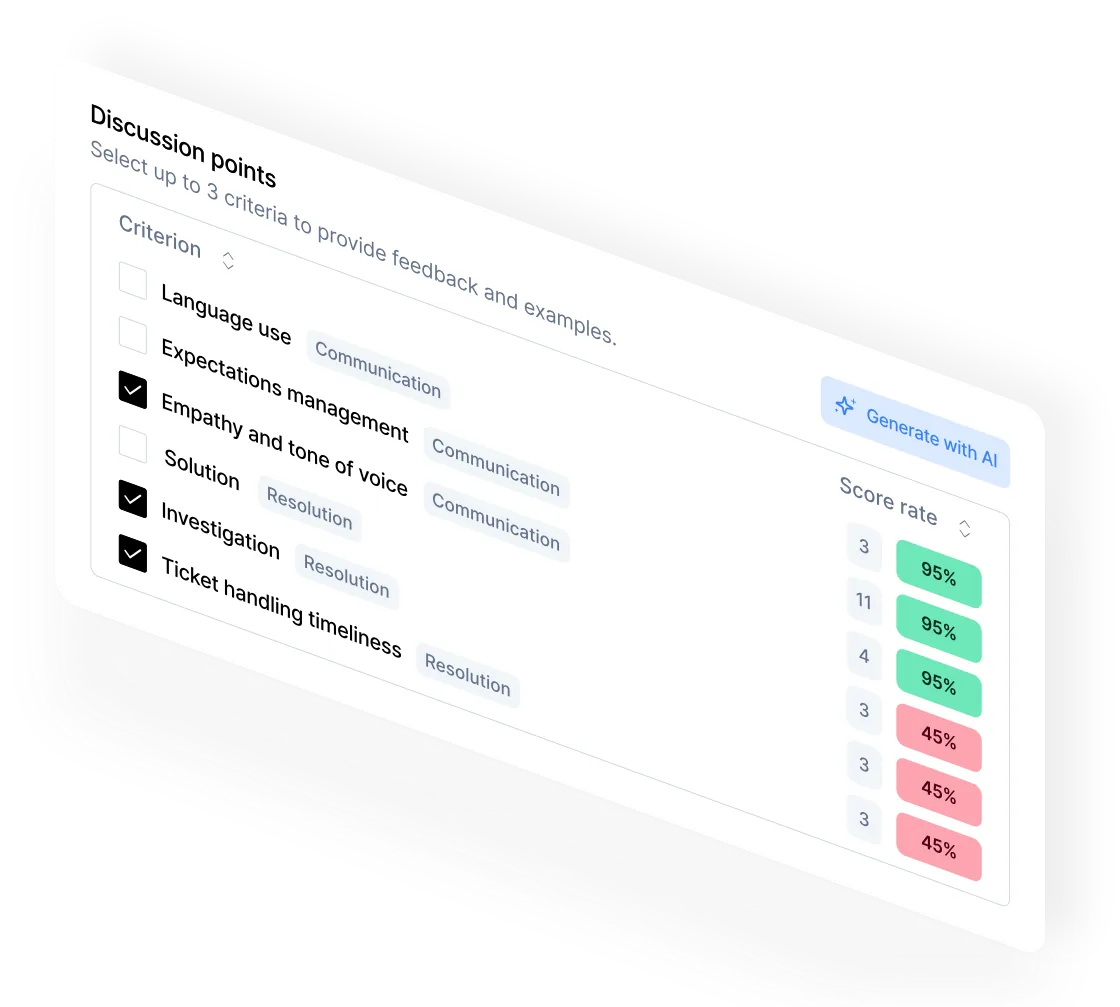
- Identify the gap. AutoCoaching looks only at markdowns - the criteria where an agent scored below the max - on the criteria a coach explicitly selects. Full-score evaluations are excluded, so the analysis is focused on what actually needs work, not a summary of everything.
- Generate the plan. AutoCoaching drafts a coaching session from the agent's real flagged conversations on those criteria, with every coaching point linked back to the specific source ticket it came from.
- Assign the action. The session is capped at six action items total, a deliberate limit against the generic fifteen-item list nobody actually works through. The agent gets an assigned, specific set of things to do next, not a wall of feedback.
This is post-QA coaching support: it works from the scored conversation after the fact. It is not live or in-call agent guidance, and Intryc does not claim to be a real-time coaching layer that whispers in an agent's ear mid-conversation. What it does is take the QA finding and turn it into a coaching action a manager can hand to an agent the same day the pattern shows up, instead of the following week's 1:1.
How QA-linked simulations support practice on flagged skills
A coaching conversation tells an agent what to work on. It doesn't give them a place to practice it before the next real customer conversation.
Intryc closes that with Training Simulations built on the same evaluation data. When an evaluation flags a specific skill or scorecard criterion, that failure can convert into a targeted simulation or quiz on the same criteria - not a generic onboarding module, but practice built from the actual pattern that showed up in live tickets. Simulations run across chat, voice, and email, and are scored by the exact same AutoQA engine that scores live conversations.
That last point matters more than it sounds. Because training and live evaluations run on one engine and one scorecard, a manager can compare an agent's simulation score on a criterion directly against their live-ticket score on the same criterion - not two disconnected numbers from two different tools.
What this does not do: simulations and quizzes give an agent a place to practice a flagged skill, and they let you compare training performance to live performance. They do not guarantee an agent's live scores will improve, and they do not replace a manager's judgment about whether an agent is ready, whether the coaching landed, or when to escalate. Simulations are the practice layer of the loop - they support the coaching, they don't substitute for the coach.
What managers still own in an AI-supported coaching workflow
It's a fair question, and worth answering directly instead of dodging it: what does a QA manager still do once AutoCoaching is generating plans?
Managers set the direction. A coach chooses which criteria AutoCoaching analyzes for a given agent or session - the platform doesn't decide unilaterally what an agent needs to work on. That judgment call, informed by the manager's read of the team and the individual agent, stays with the manager.
Managers deliver the coaching. AutoCoaching drafts the plan and the action items; a person still has the conversation with the agent, reads the room, answers questions the ticket data can't, and decides how to frame the feedback for that individual. Sessions move through a Draft to Scheduled to Delivered lifecycle - the manager is the one moving them through it.
Managers own escalation and judgment calls. Whether a repeated markdown is a training gap, a process problem, or a performance issue that needs a harder conversation is a management decision. Intryc surfaces the pattern; it doesn't make that call.
What AutoCoaching actually does: it gives managers the volume and consistency they can't sustain by hand - a coaching plan generated from real flagged tickets, with the action items already drafted and linked to their source, for every agent who needs one, not just the two or three a manager has time to build from memory this week.
To be direct about the boundary: Intryc is QA-native coaching support, not live in-call agent guidance, a named coaching-framework library, or a full people-management system - it replaces the manual, memory-based work of turning a QA finding into a coaching plan, at a volume no manager can sustain by hand, not the manager who decides what matters and delivers the conversation. Teams that need live guidance, a framework library like GROW or SBI, or full performance-review workflows should evaluate those as a separate layer.
Which coaching and performance signals teams can monitor
Reporting only means something if it's built on a coverage base wide enough to trust. Intryc's coaching and performance signals draw from 100% of evaluated conversations - not a 5% sample - across these views:
- Agent-level score trends. How an individual agent is trending over time, broken down by scorecard criterion, without losing the team benchmark for comparison.
- Scorecard breakdowns. Which criteria are driving an agent's or team's score up or down.
- Root cause analysis. Not just that a criterion is failing, but which conversation types, topics, or agent cohorts the failure clusters in.
- Coaching workflow tracking. Every coaching session's status through its Draft, Scheduled, and Delivered lifecycle, so a flagged issue doesn't disappear into a manager's inbox.
- Training activity and engagement. Which agents completed assigned simulations and quizzes, and how they scored on the same criteria that triggered the coaching.
- Repeat-mistake monitoring. Whether a criterion an agent was coached on shows up again in later evaluations.
These are signals to review, not proof that a specific coaching session caused a specific outcome. A rising score on a coached criterion after a session is a good sign worth looking at - it is not, by itself, an attribution report proving the coaching caused the change. Read the trend, then use a manager's judgment on what to do next.
What to validate when evaluating agent coaching software (buyer checklist)
Ask any vendor - Intryc included - to show these five things live, on your own data, before you sign:
1. The path from flagged interaction to coaching action. Ask them to pull up one real markdown and walk the path from that scored conversation to an assigned coaching action. If the answer is "the manager downloads a CSV and does it manually," that's a score tool, not a coaching system.
2. How custom scorecards inform the coaching plan. Your scorecard, your rules - ask whether coaching is generated from your actual criteria or from a generic rubric layered on top.
3. How simulations map to flagged criteria. Ask whether a failed evaluation on a specific skill converts into practice on that same skill, scored by the same engine as live tickets - or whether training and live QA are two disconnected systems that don't talk to each other.
4. What coaching and training activity is visible. Ask to see the coaching workflow status (has a session been delivered, not just drafted) and training completion data in the same view as the evaluation scores.
5. How score trends get reviewed afterward. Ask how you'd see whether an agent's score on a coached criterion moved after the session - and be clear-eyed that this is a trend to review, not an automated attribution report.
This checklist tests one thing: whether the vendor turns your own scored conversations into a coaching plan automatically, at a volume your team can't sustain by hand. If your team also needs real-time, in-call agent guidance, a named coaching-framework library, or a full people-management workflow, validate those as a separate requirement - they sit outside what QA-native coaching software like this is built to do.
Most QA programs see less than 5% of conversations. The rest is invisible.
AutoCoaching drafts each session from the agent's real flagged conversations on the selected criteria, links every coaching point to its source ticket, caps the session at six action items, and tracks the agent's score on those same criteria afterward.
They measure. Intryc measures and fixes.
FAQ
What is customer support agent coaching software?
Customer support agent coaching software connects QA evaluation data to the coaching workflow - turning a scored conversation's specific criteria gaps into an assigned coaching plan, rather than leaving a manager to build one from memory. The best platforms also link the coaching to practice (simulations on the same flagged skill) and to monitoring (score trends after the session), so the loop closes instead of stopping at the evaluation.
Does Intryc offer live, in-call agent coaching?
No. Intryc's AutoCoaching is post-QA coaching support: it analyzes an agent's scored conversations after they happen and generates a coaching plan from the criteria a coach selects. It does not provide real-time guidance to an agent during a live conversation.
Does AutoCoaching replace the QA manager?
No. A coach chooses which criteria to analyze, delivers the coaching session, and makes the judgment calls on escalation and readiness. AutoCoaching's role is generating the personalized plan and action items from QA data - the volume and consistency work a manager can't do by hand for every agent, every week - not running the coaching conversation itself.
How does coaching connect to training simulations?
A failed evaluation on a specific criterion can convert into a targeted simulation or quiz on that same skill, scored by the same AutoQA engine as live tickets. That makes training performance and live performance directly comparable on one scorecard, so a manager can see whether practice is translating to the real conversations - though it isn't a guarantee that it will.
Who needs this kind of coaching software?
QA managers, Support Ops leads, and L&D/Training Managers at teams where ticket volume has outgrown what a manager can review and coach on manually - typically 1,000+ monthly evaluations. They need the QA finding to turn into a coaching action without a manual handoff, and they need to see whether the coaching and practice are producing movement on the flagged criteria over time.
Is your coaching workflow still a manual handoff from a QA score to a manager's memory? That's the gap worth closing first.
See Intryc in action - https://www.intryc.com/request-demo